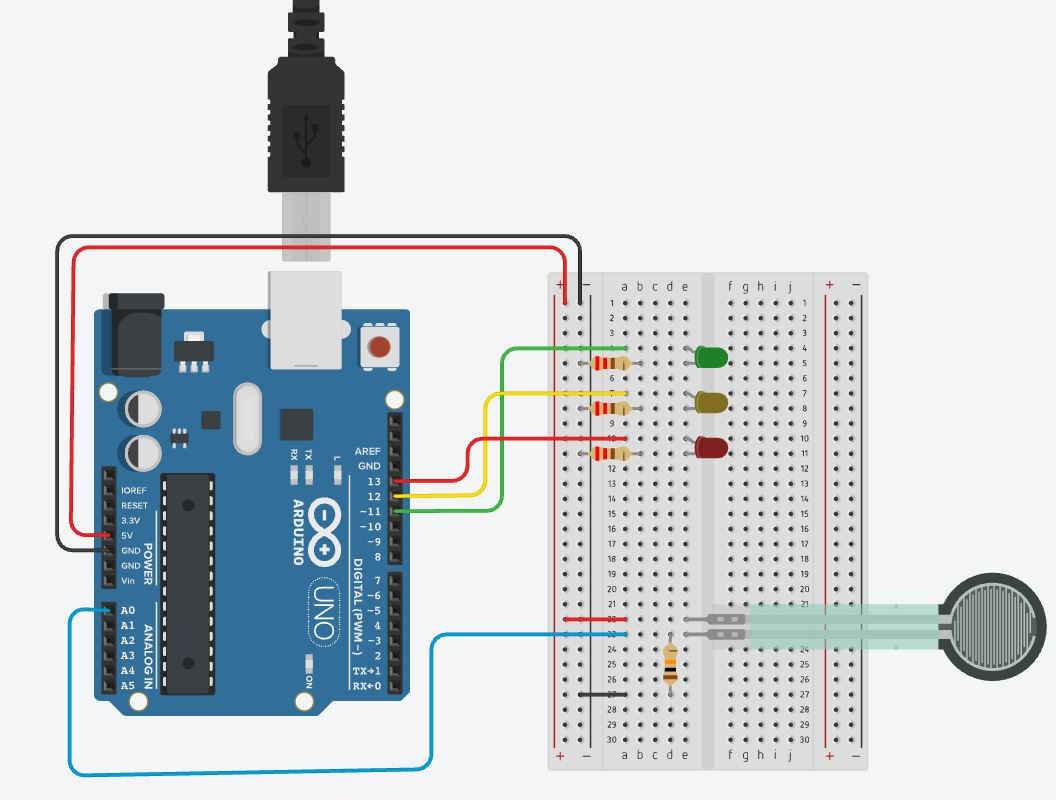
Force Sensor Circuit
public share
https://www.tinkercad.com/things/lvJXkZ8rqVa-cyberacademy-force-sensor-circuit
private share if public won’t work (make a copy/paste to your own project please)
Serial monitor code sample:
void setup () {
     Serial.begin(9600);
     pinMode(A0, INPUT);
}

void loop () {
     int sensorValue = analogRead(A0);
     Serial.println(sensorValue);
     delay(100);
}
Full code sample:
//declare variables
int sensorPin = A0;  //sensor pin
int sensorValue;     //sensor readings
int ledRED = 13;     //red led pin
int ledYEL = 12;     //yellow led pin
int ledGRN = 11;     //green led pin

/* the reason you call all the pins here is so that changes are
easy to make later on.  Plus, code is easier to read. */


void setup () {

	//code in void setup only runs once


	//start serial monitor for communication with controller.
	Serial.begin(9600);


  	//set sensorPin to input (might not be needed)
	pinMode(sensorPin, INPUT);

  	//set LEDs to output
  	pinMode(ledRED, OUTPUT);
  	pinMode(ledYEL, OUTPUT);
  	pinMode(ledGRN, OUTPUT);

}  //this bracket closes the setup portion of the code.


void loop () {

	/*code in vode loop runs over and over until poweroff.
      Once it finishes at the bottom, it loops back to the
      top to do it all over again. */


  	//get sensor value
  	sensorValue = analogRead(sensorPin);

	//report value back to the serial monitor
  	Serial.println(sensorValue);
  	/*pay special attention to the ln in println...
    the LN part tells the serial monitor to carriage return
    and move to next line so that our data isn't just going
    across the screen in a jumble forever.

    Try omitting the ln in println for fun!  */


  //turn on specific based on our recieved value from the sensor


    if(sensorValue<300){  //think about this...  if <300...
    		digitalWrite(ledRED,HIGH); //than do this stuff
    		digitalWrite(ledYEL,LOW);
   			digitalWrite(ledGRN,LOW);
  		} //now end doing stuff if true and exit the if statement completely.  "you're done, move on".
  		else if(sensorValue<700){  //it was NOT <300... so THIS if/than will catch a value of 300-699.
    		digitalWrite(ledRED,LOW);
    		digitalWrite(ledYEL,HIGH);
    		digitalWrite(ledGRN,LOW);
  		}
  		else { //whatever's left... (700-1023)
    		digitalWrite(ledRED,LOW);
    		digitalWrite(ledYEL,LOW);
    		digitalWrite(ledGRN,HIGH);
  	} //end of if statement


	delay(100); //simon says FREEZE for 0.1 second


}  //that's it!  Go back to the top of void loop and do again.